
说明
今天扒拉ys168网盘的时候,发现了曾经研究的一个批处理。他的作用就是通过批处理的debug命令,将内置的十六进制转换为文件。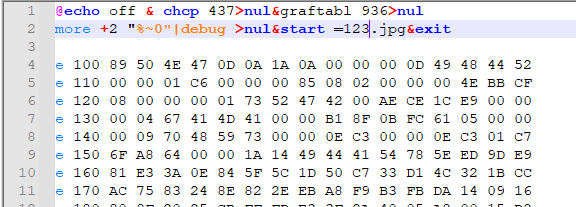
但由于debug的命令只会存在于32位的系统上,但32位系统现在已经退出舞台了,所以这种方式基本已经被淘汰了。
正好今天通过AI又重新研究了这一块的功能。
截图
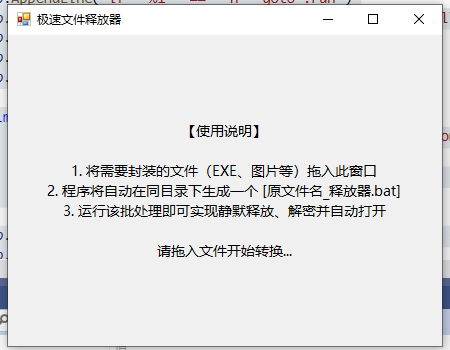
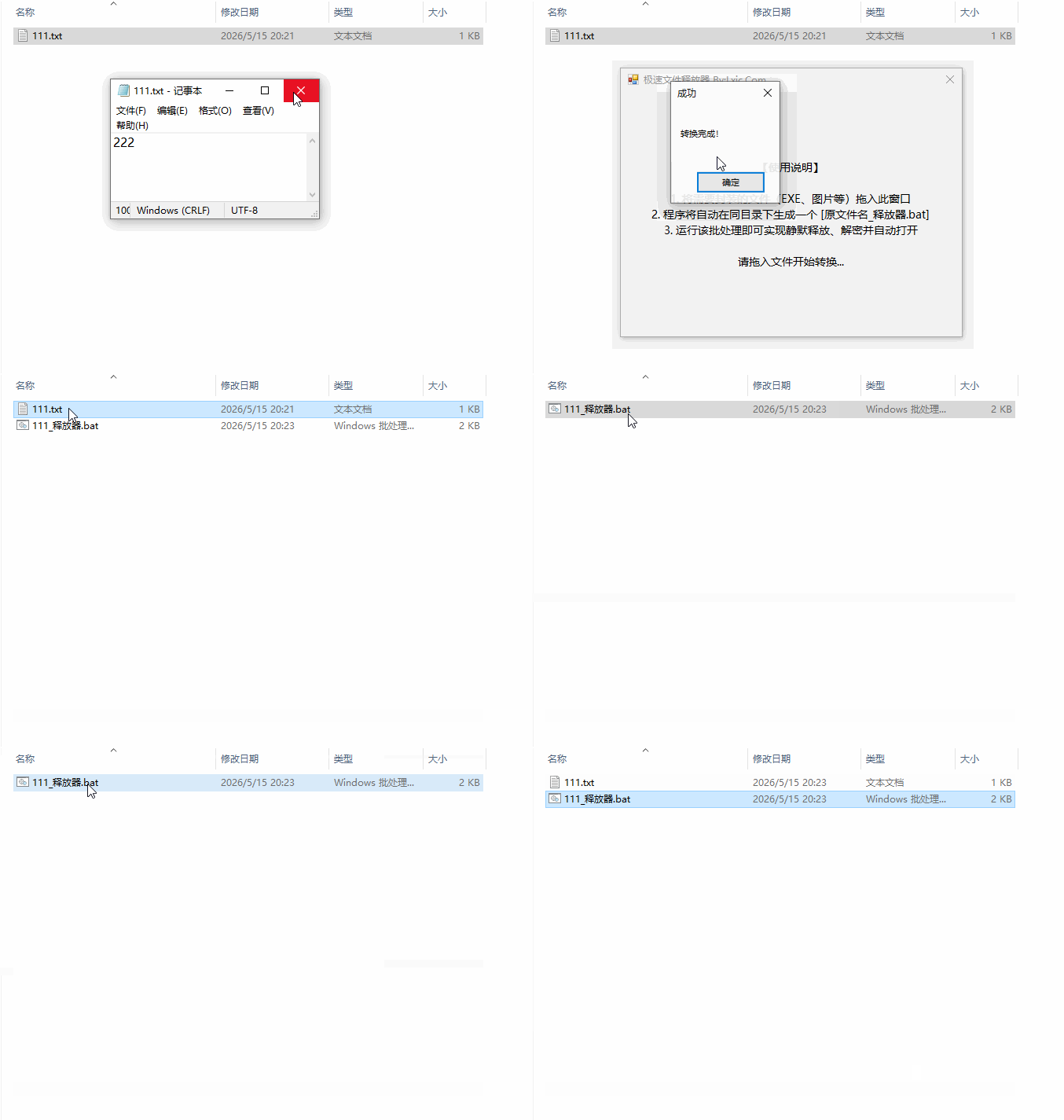
演示
成品下载
源码
Imports System.IO
Imports System.Text
Imports System.IO.Compression
Imports System.Collections.Generic

Public Class Form1
    Private CheckBox1 As CheckBox

    <System.Reflection.Obfuscation(Feature:="virtualization", Exclude:=False)>
    Private Sub Form1_Load(sender As Object, e As EventArgs) Handles MyBase.Load
        Me.Text = "极速文件打包器 (双模版)"
        Me.Size = New Size(450, 350)
        Me.StartPosition = FormStartPosition.CenterScreen
        Me.AllowDrop = True

        CheckBox1 = New CheckBox With {
          .Text = "输出到临时目录运行 (支持任意后缀文件)",
          .Dock = DockStyle.Bottom,
          .Height = 35,
          .Padding = New Padding(10, 0, 0, 0),
          .Font = New Font("微软雅黑", 9),
          .Checked = False
        }

        Dim lbl As New Label With {
          .Text = "【使用说明】" & vbCrLf & vbCrLf &
              "1. 将需要封装的文件拖入此窗口" & vbCrLf &
              "2. 默认(未勾选)将生成内存加载器(仅限.NET)" & vbCrLf &
              "3. 勾选下方选项将生成临时目录释放器(任意文件)" & vbCrLf & vbCrLf &
              "请拖入文件开始转换...",
          .Dock = DockStyle.Fill,
          .TextAlign = ContentAlignment.MiddleCenter,
          .Font = New Font("微软雅黑", 10)
        }

        Me.Controls.Add(lbl)
        Me.Controls.Add(CheckBox1)
    End Sub

    Private Function IsDotNetExe(filePath As String) As Boolean
        Try
            System.Reflection.AssemblyName.GetAssemblyName(filePath)
            Return True
        Catch ex As Exception
            Return False
        End Try
    End Function

    Private Sub Form1_DragEnter(sender As Object, e As DragEventArgs) Handles Me.DragEnter
        If e.Data.GetDataPresent(DataFormats.FileDrop) Then e.Effect = DragDropEffects.Copy
    End Sub

    Private Sub Form1_DragDrop(sender As Object, e As DragEventArgs) Handles Me.DragDrop
        Dim files As String() = CType(e.Data.GetData(DataFormats.FileDrop), String())
        If files.Length > 0 Then
            If CheckBox1.Checked Then
                GenerateBatchFile_DropMode(files(0))
            Else
                If IsDotNetExe(files(0)) Then
                    GenerateBatchFile_MemMode(files(0))
                Else
                    MessageBox.Show("错误:当前模式仅支持 .NET Framework 4.x 可执行程序" & vbCrLf & "如需打包其他文件,请勾选下方释放模式。", "文件类型错误", MessageBoxButtons.OK, MessageBoxIcon.Error)
                End If
            End If
        End If
    End Sub

    <System.Reflection.Obfuscation(Feature:="virtualization", Exclude:=False)>
    Private Sub GenerateBatchFile_DropMode(filePath As String)
        Try
            Dim rawBytes As Byte() = File.ReadAllBytes(filePath)
            Dim fileName As String = Path.GetFileName(filePath)
            Dim directory As String = Path.GetDirectoryName(filePath)
            Dim batchFileName As String = Path.Combine(directory, Path.GetFileNameWithoutExtension(filePath) & "_打包.bat")

            Dim compressedBytes As Byte()
            Using ms As New MemoryStream()
                Using gs As New GZipStream(ms, CompressionLevel.Optimal, True)
                    gs.Write(rawBytes, 0, rawBytes.Length)
                End Using
                compressedBytes = ms.ToArray()
            End Using

            Dim rand As New Random()
            Dim xorKey As Byte = CByte(rand.Next(1, 256))

            For i As Integer = 0 To compressedBytes.Length - 1
                compressedBytes(i) = compressedBytes(i) Xor xorKey
            Next

            Dim hex As New StringBuilder(compressedBytes.Length * 2)
            For Each b In compressedBytes : hex.Append(b.ToString("X2")) : Next

            Dim rawCsharp As String = "using System;using System.IO;using System.IO.Compression;using System.Text;using System.Diagnostics;public class FastEngine{public static void Release(string m,byte k,string b64Name){string p=Environment.GetEnvironmentVariable(""SELF"");string dir=Path.GetTempPath();string t=Path.Combine(dir,Encoding.UTF8.GetString(Convert.FromBase64String(b64Name)));string s=File.ReadAllText(p,Encoding.UTF8);int i=s.LastIndexOf(m)+m.Length;string h=s.Substring(i).Trim();byte[] b=new byte[h.Length/2];for(int x=0;x<b.Length;x++){b[x]=(byte)((Gv(h[x*2])<<4)|Gv(h[x*2+1]));b[x]^=k;}using(MemoryStream mi=new MemoryStream(b))using(GZipStream g=new GZipStream(mi,CompressionMode.Decompress))using(FileStream fs=new FileStream(t,FileMode.Create)){g.CopyTo(fs);}Process.Start(new ProcessStartInfo(t){UseShellExecute=true});}private static int Gv(char c){return c<='9'?c-'0':c<='F'?c-'A'+10:c-'a'+10;}}"

            Dim base64Csharp As String = Convert.ToBase64String(Encoding.UTF8.GetBytes(rawCsharp))
            Dim base64FileName As String = Convert.ToBase64String(Encoding.UTF8.GetBytes(fileName))

            Dim sb As New StringBuilder()
            sb.AppendLine("@echo off")
            sb.AppendLine("if ""%1"" == ""h"" goto :run")
            sb.AppendLine("mshta vbscript:createobject(""wscript.shell"").run(""""""%~f0"""" h"",0)(window.close)&&exit")
            sb.AppendLine(":run")
            sb.AppendLine("setlocal")
            sb.AppendLine("set ""SELF=%~f0""")

            Dim psCommand As String = String.Format(
              "$c=[System.Text.Encoding]::UTF8.GetString([System.Convert]::FromBase64String('{0}')); " &
              "Add-Type -TypeDefinition $c; " &
              "[FastEngine]::Release(':::DATA:::', {2}, '{1}');",
              base64Csharp, base64FileName, "0x" & xorKey.ToString("X2"))

            sb.Append("powershell -NoProfile -ExecutionPolicy Bypass -Command """).Append(psCommand).AppendLine(""" >nul 2>&1")
            sb.AppendLine("endlocal")
            sb.AppendLine("exit /b")
            sb.AppendLine()
            sb.AppendLine(":::DATA:::")
            sb.Append(hex.ToString())

            File.WriteAllText(batchFileName, sb.ToString(), New UTF8Encoding(False))
            MessageBox.Show("转换完成!", "成功")

        Catch ex As Exception
            MessageBox.Show("错误: " & ex.Message)
        End Try
    End Sub

    <System.Reflection.Obfuscation(Feature:="virtualization", Exclude:=False)>
    Private Sub GenerateBatchFile_MemMode(filePath As String)
        Try
            Dim rawBytes As Byte() = File.ReadAllBytes(filePath)
            Dim directory As String = Path.GetDirectoryName(filePath)
            Dim batchFileName As String = Path.Combine(directory, Path.GetFileNameWithoutExtension(filePath) & "_加载.bat")

            Dim compressedBytes As Byte()
            Using ms As New MemoryStream()
                Using gs As New GZipStream(ms, CompressionLevel.Optimal, True)
                    gs.Write(rawBytes, 0, rawBytes.Length)
                End Using
                compressedBytes = ms.ToArray()
            End Using

            Dim rand As New Random()
            Dim xorKey As Byte = CByte(rand.Next(1, 256))

            For i As Integer = 0 To compressedBytes.Length - 1
                compressedBytes(i) = compressedBytes(i) Xor xorKey
            Next

            Dim hex As New StringBuilder(compressedBytes.Length * 2)
            For Each b In compressedBytes : hex.Append(b.ToString("X2")) : Next

            Dim rawCsharp As String = "using System;using System.IO;using System.IO.Compression;using System.Text;using System.Reflection;public class FastEngine{public static void Release(string m,byte k){string p=Environment.GetEnvironmentVariable(""SELF"");string s=File.ReadAllText(p,Encoding.UTF8);int i=s.LastIndexOf(m)+m.Length;string h=s.Substring(i).Trim();byte[] b=new byte[h.Length/2];for(int x=0;x<b.Length;x++){b[x]=(byte)((Gv(h[x*2])<<4)|Gv(h[x*2+1]));b[x]^=k;}byte[] finalBytes;using(MemoryStream mi=new MemoryStream(b))using(GZipStream g=new GZipStream(mi,CompressionMode.Decompress))using(MemoryStream mo=new MemoryStream()){g.CopyTo(mo);finalBytes=mo.ToArray();}Assembly asm=Assembly.Load(finalBytes);if(asm.EntryPoint!=null){object[] prm=asm.EntryPoint.GetParameters().Length==0?null:new object[]{new string[0]};asm.EntryPoint.Invoke(null,prm);}}private static int Gv(char c){return c<='9'?c-'0':c<='F'?c-'A'+10:c-'a'+10;}}"
            Dim base64Csharp As String = Convert.ToBase64String(Encoding.UTF8.GetBytes(rawCsharp))

            Dim mshtaCmd As String = "mshta vbscript:createobject(""wscript.shell"").run(""""""%~f0"""" h"",0)(window.close)&&exit"
            Dim psScript As String = String.Format(
              "$c=[System.Text.Encoding]::UTF8.GetString([System.Convert]::FromBase64String($env:B64));" &
              "Add-Type -TypeDefinition $c;" &
              "[FastEngine]::Release(':::DATA:::', {0});",
              "0x" & xorKey.ToString("X2"))
            Dim psCmd As String = "powershell -NoProfile -ExecutionPolicy Bypass -Command """ & psScript & """ >nul 2>&1"

            Dim charMap As New Dictionary(Of Char, String)()
            Dim usedVars As New HashSet(Of String)()
            Dim decls As New StringBuilder()

            Dim combinedCmd As String = mshtaCmd & psCmd
            For Each c As Char In combinedCmd
                If Char.IsLetter(c) AndAlso c <> "f"c AndAlso c <> "h"c AndAlso Not charMap.ContainsKey(c) Then
                    Dim varName As String
                    Do
                        varName = "V_"
                        For i As Integer = 1 To 5
                            varName &= ChrW(rand.Next(65, 91))
                        Next
                    Loop While usedVars.Contains(varName)

                    usedVars.Add(varName)
                    charMap.Add(c, varName)
                    decls.AppendLine($"set ""{varName}={c}""")
                End If
            Next

            Dim obfuscateText = Function(input As String) As String
                                    Dim res As New StringBuilder()
                                    For Each c As Char In input
                                        If charMap.ContainsKey(c) Then
                                            res.Append($"%{charMap(c)}%")
                                        Else
                                            res.Append(c)
                                        End If
                                    Next
                                    Return res.ToString()
                                End Function

            Dim obfMshta As String = obfuscateText(mshtaCmd)
            Dim obfPs As String = obfuscateText(psCmd)

            Dim sb As New StringBuilder()
            sb.AppendLine("@echo off")
            sb.AppendLine("setlocal")
            sb.Append(decls.ToString())
            sb.AppendLine("if ""%1"" == ""h"" goto :run")
            sb.AppendLine(obfMshta)
            sb.AppendLine(":run")
            sb.AppendLine("set ""SELF=%~f0""")
            sb.AppendLine("set ""B64=" & base64Csharp & """")
            sb.AppendLine(obfPs)
            sb.AppendLine("endlocal")
            sb.AppendLine("exit /b")
            sb.AppendLine()
            sb.AppendLine(":::DATA:::")
            sb.Append(hex.ToString())

            File.WriteAllText(batchFileName, sb.ToString(), New UTF8Encoding(False))
            MessageBox.Show("加载器生成完成!", "成功")

        Catch ex As Exception
            MessageBox.Show("错误: " & ex.Message)
        End Try
    End Sub
End Class

源码与成品互不相同
成品仅为临时目录释放并打开。
源码为双模式的版本。
新增的可以在内存中打开。